Updated to include the Windows version of the CLI.
Problem:
You’re using Kiro-CLI from Amazon to build .Net application written in C#. Alas, Kiro CLI doesn’t support C# out of the box. Instead of having a rich understanding of your code-base and getting real-time feedback from Roslyn, Kiro just thinks it is editing text files. If a build fails, it often goes down a rabbit hole trying to fix the issue.
Fear not friends. We can add C#/Roslyn LSP support!
Adding C#/Roslyn LSP to Kiro-CLI
Step 1: Install the Roslyn Language Server
Microsoft recently released the roslyn language server as a standalone executable, installable as a dotnet tool. So simply:
dotnet tool install -g roslyn-language-server --pre-release
As of this writing, the pre-release is important as the tool itself is still in pre-release.
Step 2: Configure Kiro-CLI
If you haven’t already, initialize the code integration tool. Inside the kiro-cli:
> /code init
Edit .kiro/settings/lsp.json and add (or merge) the following lsp config:
For Linux/MacOS:
{
    "csharp": {
      "name": "roslyn-lsp",
      "command": "roslyn-language-server",
      "args": ["--autoLoadProjects", "--stdio"],
      "file_extensions": ["cs"],
      "project_patterns": ["*.csproj", "*.slnx"],
      "multi_workspace": true,
      "exclude_patterns":[
        "**/bin/**",
        "**/obj/**"
      ]
    }
}
For Windows, to work around a limitation with Rust’s ability to run scripts directly,
we have run cmd and pass the script as a parameter:
"csharp": {
  "name": "roslyn-lsp",
  "command": "cmd",
  "args": ["/C", "roslyn-language-server", "--autoLoadProjects", "--stdio"],
  "file_extensions": ["cs"],
  "project_patterns": ["*.csproj", "*.slnx"],
  "multi_workspace": true,
  "exclude_patterns":[
    "**/bin/**",
    "**/obj/**"
  ]
}
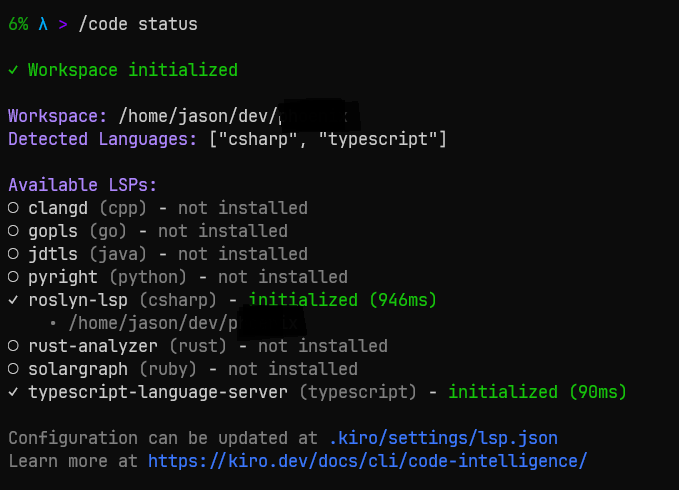
That’s it! If you start kiro-cli and run /code status you should see roslyn loaded…
Conclusion
While not available out of the box, it is easy to add C#/roslyn support to Kiro-CLI.
Unfortunately, the Kiro IDE does not use these LSP settings. The IDE relies on CodeOSS extensions which, as of this writing, are still sadly lacking. I tried ReSharper, but Kiro IDE still has no clue.
If you’re CLI-heavy in your agentic workflows like I am, though, this will get you back in business if you’re using Kiro.
Cheers!